Showing posts with label Trick. Show all posts

Tuesday, October 6, 2015

5 features we’d love to see on Android phones in 2015

flagship smartphones aa (8 of 18)
Smartphone technology moves fast, but manufacturers can also be pretty cautious at times. The easiest and surest route to profit is often to match the competition and build on what’s there, rather than go back to the drawing board. While there’s an ever-expanding roadmap of possibilities opening up before us, many prove to be dead ends, and it takes major success with a road less traveled before the pack takes note.

I wrote this exact feature two years ago, 5 features we’d love to see on Android phones in 2013, and while there’s been some progress, three of those entries are going to make this list as well. Better Wi-Fi and more antennas don’t seem pressing anymore, but flexible displays, better batteries, and tougher phones are still totally relevant.

Flexible displays


We’ve seen a toe dipped in the water with regard to flexible displays as Samsung and LG have experimented with curves in the shape of the Samsung Galaxy Round and the LG G Flex. But a very slight curve in the rigid display is not what we have been waiting for.
samsung galaxy note edge review aa (23 of 26)

The Samsung Galaxy Note Edge is a real step in the right direction. Here’s something that’s genuinely innovative. It has a strip on the edge that can come to life independently of the main display and offer extra controls. It’s also potentially readable on the nightstand when you’re lying in bed. It would have been more impressive if Samsung had the bravery to launch it as the flagship Note, the next step in the series and really throw some marketing weight behind it. The strip is a good idea, but you also get the feeling it needs imaginative software developers to make the most of it and Samsung might not be the best company to deliver. Honestly, it’s still not what we’ve been waiting for.

What we’ve really been waiting for is a device with a genuinely flexible display that folds from smartphone size for your pocket up to tablet size when you want a larger screen. Flexibility introduces serious technical challenges relating to touchscreen functionality, not to mention the rest of the components that make up the average smartphone. Although I could see the value in a device with a normal smartphone touchscreen and an extendable display without touch functionality for reading and watching movies on.

It’s going to take a seriously clever design to pull this off. I don’t expect it next year, or even the year after that, but we should see some new designs in the short term that challenge the slab form factor and use flexible displays in innovative ways.

Better batteries


The average size of batteries is going up, but OEMs keep building bigger, higher resolution screens. A lot of the new hardware inside smartphones is about doing more with less power, but are we really feeling the benefit? I think battery life has improved a lot, but it depends on what device you use. My Xperia Z2 definitely outlasts any previous Android phone I have owned (HTC Desire, Samsung Galaxy S3, Nexus 5), but I’m greedy and I still want it to last longer.
aa-htc-butterfly-2-battery

We’ve looked at why wireless charging hasn’t taken off properly in the past. There is technology in the works to charge your device while it sits in your pocket, but is this kind of charging really the answer to our battery woes? Charging speeds have been increasing and there’s obvious value in being able to fully charge a phone in an hour or less, but it still won’t solve the problem of running out of juice.

Battery saving software has been improving as well, but maybe the designers need to do more to consider power usage. What kind of trade-off would you accept? If you got 25% longer battery life if your phone had a 1080p display, over a 4K display would you take that deal? Battery life is improving, but OEMs could be taking more advantage. The E-Ink display on the YotaPhone 2 is a great example of some smart design that could really boost battery life.

Tougher phones


This has been tackled to an extent, as Sony pushed waterproofing into the Android mainstream. I’ve dropped my phone in the bath twice without any ill effects; though in the past I probably wouldn’t have risked using my phone in the bath. Water resistance should be standard in a smartphone now.
LG G Flex Drop Test Outdoors AA (18 of 25)

The trouble is that general toughness has not improved. My Xperia Z2 survived a fall from standing height onto a tile floor unscathed, but then fell off my lap while sitting onto a wooden floor and cracked. There’s a definite element of luck to smartphone falls, but a thin slab of glass and metal or plastic is inevitably going to be prone to breaking on impact with a hard surface.

I resent having to slap a case on my beautifully designed smartphone. I want it naked. There are some great case manufacturers out there, but they’re still a reluctant necessity rather than something to get excited about. The trouble from an OEM point of view is that greater durability without adding bulk is tough and everyone wants slim devices. There’s limited benefit to them because they make money if you break your phone and have to repair it or buy a new one. The strength of durability as a selling point for consumers isn’t all that clear.

No more passwords, wallets, or keys


nexus 6 first impressions (3 of 21)


Imagine that your smartphone knows when you are holding it without you having to enter a password, PIN, or pattern. Biometric finger or eye scanning, or voice recognition are all potentially much more convenient. It could even learn the way you move, measure distances, recognize your gait. A combination of factors could make this really secure. It should unlock automatically when you hold it and lock up when someone else does, unless told otherwise.

If your smartphone can reliably identify and authenticate you then it would be safe to use it as your universal key. I want my smartphone to start my car and unlock my front door. I want to use my smartphone to pay for goods and services. I don’t want to have to carry anything else. The technology is here, it just needs to be polished and proven trustworthy.

People often argue the dangers of a system like this, but fail to recognize that the current system is less secure. If I steal your wallet, I can spend your cash. I can probably get away with using your plastic in certain scenarios without needing the PIN. I can certainly use your keys to enter your house or drive your car. I can’t do any of that with your smartphone if it has a secure authentication system that won’t let me in.

Thinking ahead


I’m possibly overexcited by the potential pre-emptive powers of Google Now, but the reality is often disappointing. Pushing up a train timetable as I arrive at the station, warning me about traffic, or providing a sports score update is all well and good, but I’d like to see it go further.
google now nexus 5 2

As Google Now spans more devices and potentially has access to more data about me, I’d like it to do more for me. For a start it should be able to sync across devices and update accordingly when I dismiss something, I don’t want to see the same card I swiped away on my phone still there on my tablet or desktop (that applies to all Android notifications).

It should be the hard-working personal assistant that most of us can’t afford. Remind me to send a message to this person without me having to set a reminder, tell me that my favorite band is playing close by next month, or make sure I don’t forget to pay a bill. How about telling me I could save money by switching to this service, or alerting me to a big discount deal on something it knows I want?

I want an Android phone that’s thinking ahead for me.

That’s it for now. Agree or disagree? Want something else I didn’t mention? Hit the comments and tell us. I’ll see you in two years when hopefully I’ll have to draw up a completely new list because these features have been delivered.


Source from:

http://www.androidauthority.com
·   0

Monday, October 5, 2015

Three Tips for Implementing a Tech-Based Learning Environment

To assist schools grappling with making the digital leap, three large, national professional education associations offer practical guidance, best practices and examples of model technology-enabled schools.


Computer science in schools


A student takes a class on Raspberry Pi, a credit card-sized single-board computer developed to promote the teaching of basic computer science in schools.

Making a digital leap isn’t simply a technology initiative; it’s planning and implementing a technology-based learning environment for all students -- a digitally-enabled ecosystem that is continuously improving, according to one organization. But when educators have a limited understanding of how to successfully integrate technology within education, it might seem as though they’re facing an abyss.

To assist schools grappling with these efforts, three large, national professional education associations combined forces, offering practical guidance, best practices and examples of model technology-enabled schools.

In 2014 the School Superintendents Association (AASA), Consortium for School Networking (CoSN) and the National School Boards Association (NSBA) formed Leading the Digital Leap, a nonprofit that has set out to help schools learn from and avoid spectacular problems, such as those associated with the controversial Los Angeles County Unified School District's iPad program rollout and the bankruptcy of ConnectEDU Inc., in which confidential student data was sold.

Where does it all begin? With a focus on education, not technology, according to Keith Krueger, CEO of CoSN. He and officials from the aforementioned organizations have offered up three key tenets for planning a successful tech-based learning environment.

1. Plan Before Purchasing


“This initiative is about saying, ‘Let's define what our vision is around the learning, and then let’s find the right tools," Krueger said. “You start with the questions of, ‘How do we prepare students to be college-ready, career-ready and life-ready? What are the skills that we want them to have? What does the learning environment look like that enables that? How do we enable the enterprise of learning and use technology to create better learning?’ ”

Answering those questions and getting answers from all stakeholders – educators, administrators, school board members, community members, civic leaders and business people – is the first step, Krueger said, and equals approximately 70 percent of the work involved in planning a digital leap.

The second step -- getting technology into the school, classrooms and hands of educators and students -- is only 30 percent of the effort, and it comes at the end. While it is, in fact, important, he said that most schools get into trouble because that’s where they start.

The Digital Leap offers resources (see below) that any school community can utilize and adapt to address where it is on the continuum of technology adoption, from just starting out or advancing an existing program. This takes the guesswork out of leveraging technology, says Ann Lee Flynn, director of education technology for the NSBA.

“There is not a single silver-bullet solution out there that works as a one-size-fits-all,” she says. “It really is dependent on a district. Every community comes at this with a different set of criteria and needs. That's why it has to be thought about as customizable.”

2. Replicate Technology Success


The Digital Leap resources are organized into four main categories that articulate the best approach to the implementation process:

  • see offers successful programs;

  • hear gives advice from digital leaders;

  • learn teaches how to become a digital leader; and

  • do offers action steps to follow.


Flynn suggests a practical way to begin with the end – visiting a school with a clearly defined vision that supports a technology-enabled learning environment.

“[Try] going somewhere that's further along than where you actually are to see some good examples in practice," she said, "to understand and talk to the key players, to understand how they did it."

A few key elements of a tech-enabled learning environment are: leadership support, a realistic vision, making technology usage part of the school culture, providing/maintaining the essential infrastructure, teacher training, educating the community about what 21st century education looks like, and sustainable funding.

Without a comprehensive approach, schools can fall into the trap of experimenting with different initiatives but never exiting the beta testing stage for any of them. It’s important to learn from this and other mistakes, says James Minichello, director of communications and marketing for AASA.

“But in order to make an impact," he said, "we have to spend the time and resources … to learn properly how to use the particular [technology] we’re working with.”

3. Usher in a Culture Change


Even though this cost-free resource is available to any school district that wants a technology-based education environment, it’s useless until the main source of resistance to making the digital leap is addressed – people.

“There are technological challenges in education, but those are not as challenging as the culture and people challenges,” Krueger says. “The big, hairy problem is people -- getting people who have grown up doing things a different way to do things in a new way. What we're talking about is getting most of the teachers and administrators and maybe even parents to understand what learning looks like for kids today. [Kids] don't view it as ‘technology.’ They view it as life. It's just the way it is.”

To illustrate, Krueger describes how television was “new technology” for his parents, but for him, it was just TV. In much the same way, the radio was part of everyday life for his parents, but was an amazing innovation for his grandparents.

“Alan Kay, one of the Apple chief scientists, says, 'Technology simply means it was invented after you were born.' Today's mobile, internet-enabled, cloud-based technology is just life for today's students. We as adults need to figure how we create a new learning environment that leverages these new possibilities.”

A recent CoSN survey (PDF) of educational leaders revealed that 80 percent of technology budgets for the current academic year are flat or declining. This affects everything from classroom learning and student counselling to administration and building operations, so schools need a vision and plan for making sure technology is available and functional.

The best way to accomplish that digital leap? “Technology has got to become engrained in a district's DNA," Flynn said. "This is how we do things."


Source from:

http://www.centerdigitaled.com
·   0

The Forgotten Capital of Khmer Empire


Posted on May 12, 2013


Pyramid Temple-Prasat Thom, Koh Ker, Cambodia

Most people are familiar with Khmer Empire’s capital of Angkor in the Siem Reap district in Cambodia, but not many have heard of Koh Ker, the once grand capital of the Khmer empire for a brief period between 928 to 944 AD.

Left for a millennium in the jungle in the northern province of Cambodia close to the border of Thailand, Koh Ker is the most remote archeological site in the country. It was very inaccessible for a long time and was rarely visited until the road development in 2004. The site can now be easily reached by car from Siem Reap in about two hours and forty-five minutes.


Prasat Krahom (Red Temple), Koh Ker, Cambodia

Khmer Empire’s capital was moved from Angkor to Koh Ker (pronounced ‘Ko Kei’) by King Jayavarman IV during his reign. Being the least studied among Khmer temple complex, it is unclear what motivated King J IV to move the capital.  The capital was moved back to Angkor when his son succeeded him to the throne.


Ruins of Koh Ker in Cambodia,

More than 100 temples and sanctuaries were built in Koh Ker during its brief stint as a Khmer capital. However, only about 40 of them are accessible to visitors today. Most of them are still hidden in the thickness of the jungle.  Local authorities are unable to clear them of vegetation as they are located in areas that have not been cleared of landmines.


Ruins of Koh Ker in Cambodia

Koh Ker temples housed extraordinary sculptures, but none of them are left at the site as the temples were heavily looted.  Many of them are illegally in the possession of private collectors and international museums, and some are kept in Cambodian museums.


Ruins of Koh Ker in Cambodia

Interestingly,  New York Times recently published an article reporting that the Metropolitan Museum of Arts in New York was  returning two Koh Ker statues to Cambodia. This was the outcome after Cambodia’s officials successfully documented that the two statues that were donated to the museum were actually smuggled out of the country in the 1970’s.


Ruins of Koh Ker in Cambodia

It looks like efforts are being made to secure some of Koh Ker’s structure from further falling apart, but no restoration works has been done at the temple complex. Archeological surveys were undertaken in the 1960’s but all studies were destroyed during the rule of Khmer Rouge regime.


Pyramid Tempe-Prasat Thom, Koh Ker, Cambodia

The main temple in Koh Ker is Prasat Thom, a 7-tiered pyramid that look more like a Mayan than a Khmer temple. A giant linga, a phallic symbol for Hindu god Shiva,  used to sit at the summit but has long disappeared.


Prasat Thom, the pyramid structure and main temple in Koh Ker, Cambodia

Visitors used to be able to climb to the top of the temple but the staircase has been closed for safety reasons. We thought it was too bad; we heard the view from the top was very spectacular.
Our driver, Mr. Pop, who had been to Koh Ker many times, was surprised to get a cell phone signal at the site for the first time. He saw wires going up behind the  temple and realized that it is now used a cell tower.


Linga base, Koh Ker, Cambodia

Most temples and sanctuaries housed a linga. Most of them are gone but some of their bases still stand.


Ruins of Koh Ker, Cambodia


We hopped back into our car to visit some of the Prasats (temples) that dotted the access road that circles the main temple area.

Shiva Linga in Prasat Thneng, Koh Ker, Cambodia

The largest remaining Shiva linga in Koh Ker is housed in the ruin of Prasat Thneng, located one km from Prasat Thom.


Prasat Cha Krap, Koh Ker, Cambodia

Prasat Kra Chap


Prasat Neang Khmau, Koh Ker, Cambodia

Prasat Neang Khmau known as the Temple of Black Virgin.


The Caretaker, Koh Ker, Cambodia

Aside from the two of us and Mr. Pop, the only other souls in the temple complex during our visit were the lovely caretaker and her adorable children and pet.

If you’re looking for well-restored temples, then obviously Koh Ker is not for you. What we liked about this site was that it gave us a sense of how the Khmer temples were like when the explorers just stumbled upon them in the 19th century. It also let our imagination go wild on how grand the temple complex was at its peak. Also, Koh Ker may be a long drive from Siem Reap but we very much enjoyed the beautiful and tranquil view of the countryside along the way.


Source from: http://www.travelingsolemates.com


·   0

Tuesday, September 22, 2015

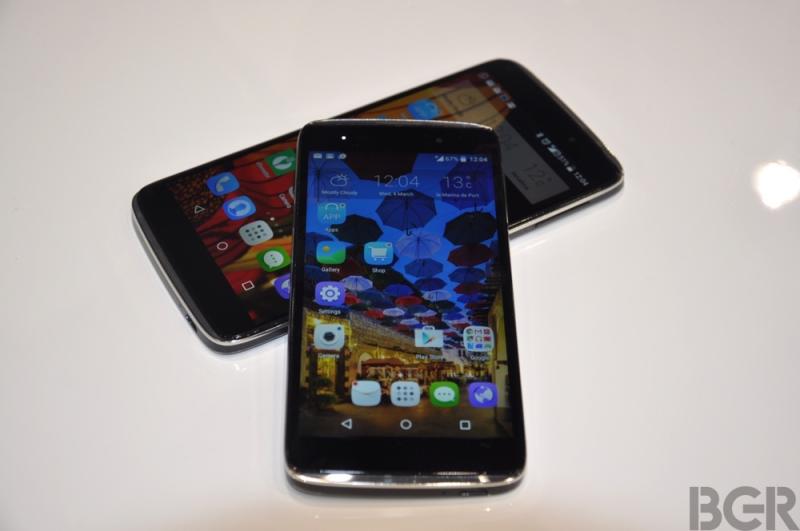
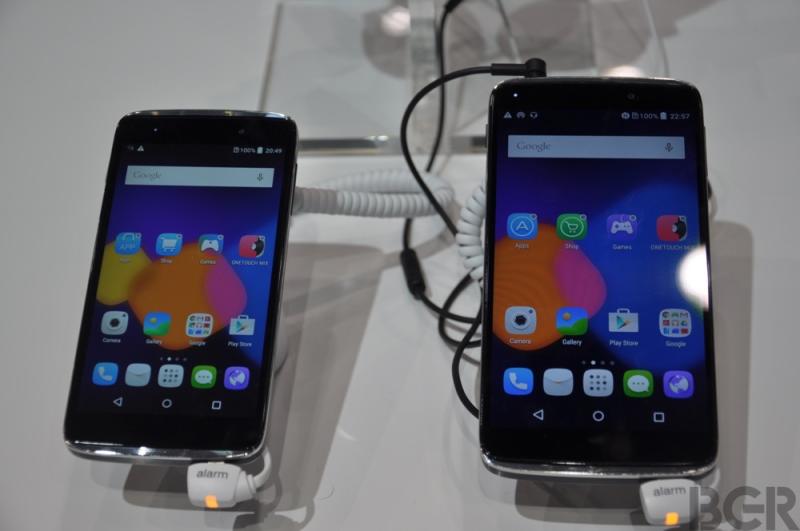
Meet Alcatel’s new Android phones, the biggest underdogs of MWC 2015


Meet Alcatel’s new Android phones, the biggest underdogs of MWC 2015

alcatel-one-touch-idol-3-mwc-2015-52


Apple’s 4.7-inch and 5.5-inch iPhone 6 models are the smartphones to beat this year, and some companies have already come out with worthy rivals, including the HTC One M9 and the Galaxy S6 that both debuted at this year’s Mobile World Congress. But these top devices were not the only Android handsets unveiled at the show, with one company coming out with a set of brand new smartphones that, coincidentally or not, have exactly the same screen sizes as Apple’s 2014 iPhones.


FROM EARLIER: Hands-on with the best Android smartwatch that has ever been made


Alcatel on Monday unveiled the OneTouch Idol 3 line that contains precisely two models: A 4.7-inch version and a 5.5-inch version. But even though Alcatel says these smartphones feature top-line technologies, they’re not necessarily flagship handsets by this year’s standards.


Of course, the two smartphones do have some special features that are supposed to differentiate them from competitors, but don’t think of unibody two-tone aluminum designs or curved displays. Instead, Alcatel is offering users JBL audio integration and two-front facing speakers for significantly improved audio.


The phones also have a feature you don’t see on any other devices: 100% reversability, which means their software can adapt automatically to the screen orientation, no matter how a OneTouch Idol 3 is held.


However, this 100% reversability feature only concerns the user interface — the physical buttons on the handset, or the cameras’ placements, can’t change positions just because you want to hold the device in a different way. The feature is really useful for not having to bother with picking the device in the right way to make sure everything on the screen is facing up.


The most interesting thing about them is that they will both launch with Android 5.0 Lollipop on board, which should be good news for anyone looking for some affordable Android devices capable of delivering great performance.


Specs-wise, the 4.7-inch model has a 720p display, 1.2GHz Snapdragon 400 processor, 1GB of RAM and 8GB of storage (16GB available for dual-SIM model), microSD support, 13-megapixel main camera, 5-megapixel front-facing camera, and 2,000 mAh battery.


The 5.5-inch OneTouch Idol 3 has a bigger display with Full HD resolution, 64-bit octa-core Snapdragon 615 processor, 2GB of RAM, 16GB/32GB of memory (depending of number of SIMs) and 2,910 mAh battery.


The phones should be launched at some point in April, with prices ranging from around $200 for the 4.7-inch handset, and at around $250 for the 5.5-inch phablet.


alcatel-one-touch-idol-3-mwc-2015-1


Source from: https://www.yahoo.com

·   0

Monday, September 21, 2015

Ativ Book 9 and Ativ One 7: Ultrabook and fanless all-in-one in curved screen from Samsung

Ativ Book 9 and Ativ One 7: Ultrabook and fanless all-in-one in curved screen from Samsung

Samsung anticipates that the upcoming CES in Las Vegas will bring two exciting and innovative products: Ativ Book 9, the lightest laptop of the family as well as the first with fanless design, and Ativ One 7 all-in-one with a curved display. Samsung will take the next CES in Las Vegas two innovative personal computer: a fanless laptop with Intel Core M and WQXGA display and a system all in one with curved display from 27 “, the first to be counted among the specifications the particular design feature.

The Both products have been officially announced by press release, and will be shown to the important event coming up next week. We begin with Ativ Book 9: often little more than an inch (about 1.2) and weighing less than a kilogram (950 g), it will be the lightest laptop Samsung. With these numbers, Ativ Book 9 can be delivered to the company that also without the need of a laptop bag. Interesting but especially inside out: under the body will find a processor Broadwell series Intel Core M.

Thanks to the low-power consumption of the new technologies of Santa Clara, Ativ Book 9 uses a fanless cooling system and provides an operating range of 10.5 hours, despite the design features extreme. The display adopted supports a maximum resolution of 2,560 x 1,600 pixels in a diagonal of 12.2 inches and with the mode for external reaches a maximum luminance of 700 nits (which become 350 when used normally).

Below is a list of technical specifications: Display:

  • 12.2″ WQXGA (2,560 x 1,600) LED backlit.

  • Processor: Intel Core M 5Y10c GPU with Intel Graphics 5300.

  • RAM: 4 or 8 GB.

  • Storage: 128 or 256 GB.

  • Autonomy : up to 10.5 hours.

  • Ports: 2 x USB 3.0; microHDMI, SD, via RJ45 dongle, combo headphone and microphone.

  • Dimensions: 284 x 212 x 11.7 mm.

  • Weight: 950 g.


Samsung Ativ Book 9 will be available to pre-order in the first quarter 2015, with a base price of $ 1,199.

samsung-ativ9

Equally interesting is the new Samsung Ativ One 7. It was the first computer with curved display integrated technology that the Korean manufacturer has already raised on a number of televisions, monitors and on some models of smartphones, and it points to a lot of respect innovation in the consumer-electronics market.

The panel is 27″ in full HD resolution (1,920 x 1,080), while the technical specifications are typical of the mid-range category: the processor is an Intel Core i5 unspecified, supported by 8 GB of RAM and a hard disk mechanical 1 TB (a combo with a SSD would have been nice). On the software side, we will find of course Windows 8.1 64-bit.

There will be a 1080p webcam, a stereo sound system 10 watts per channel with support for Dolby Sound effects and transmission technology lossless audio APT-X, and input and output HDMI. Those who have a smartphone Samsung will also be able to send and receive text messages and calls directly from your computer with software SideSync 3.0.

samsung-ativ7


Source from: http://www.wiselyguide.com
·   0

Microsoft: Kiwis dreaming of a tech Christmas

With just a week until Christmas, consumers in New Zealand are starting to plan their 2015 goals, with technology tools and toys taking centre stage...


With just a week until Christmas, consumers in New Zealand are starting to plan their 2015 goals, with technology tools and toys taking centre stage in enabling them to realise their targets.

In a recent survey conducted by Microsoft Asia-Pacific, 54% of New Zealand respondents said that their top priority for 2015 is to exercise more and stay healthy.

Additionally, 31% wish to spend more time with their family while 30% of respondents hope to go on a relaxing holiday in the New Year.

When asked about the technology tools of choice to help them achieve these goals in the year ahead, 50% of respondents chose a desktop or a laptop, followed by smartphone (42%), apps (35%), social networks (34%) and tablet devices (34%).

“When we think of buying a present for our loved ones, we often think of buying the flashiest toys or the hottest devices, but tend to forget the true value of a gift is one that can empower them to achieve their personal goals,” says David Rayner, Microsoft New Zealand’s Director of Consumer Channels Group.

“It was interesting to see many respondents choosing the desktop or laptop as their preferred device."

When it comes to giving gifts of technology, the survey found that 71% of Kiwi respondents would consider buying a technology-related gift for their loved ones’ birthday, followed by Christmas (60%), then the New Year (14%).

Gift givers in New Zealand are also generous, with 44% stating they were willing to set aside between NZ$100 to NZ$600 for a technology gift to a loved one, while a quarter of respondents said that they would pay more than NZ$600.

Unfortunately for Kiwi dads, the survey showed that they were least likely to get a gift of technology this festive season.

Significant others (27%) and mums (22%) are more likely to receive a tech present, and respondents are also more likely to buy their children tech gifts (22%) during this period.

The survey also showed Kiwis’ top reasons for buying tech gifts for loved ones were for entertainment (42%), for communication with friends and family (33%), or for learning (30%).

In addition, 29% of respondents felt that a smartphone would be the most helpful tool for their loved ones to achieve their goals in the year ahead while 26% felt that a tablet would be best, along with 13% who said that a desktop or laptop PCs would do the same.

From a connectivity perspective, and with Kiwi respondents indicating that spending quality time with their family is one of their top priorities for 2015, the top four modes for communication included social networks (65%), email (58%), apps such as Skype, Whatsapp, Viber (55%) and through phone calls on mobile phones (41%).

Read More:


Join the Computerworld LinkedIn Group. This group is open to IT Leaders, MIS & IT Managers, Network & Infrastructure Managers who share insights, discuss challenges & wins and keep abreast of cutting edge technologies.


Source from: http://www.computerworld.co.nz
·   0